Friday, 28 October 2016

Chuwi Hi12 Windows 10 Tablet Review

Windows tablets that can double up as a laptop when required are becoming increasingly popular, but Microsoft’s Surface line is expensive. Alternative Windows 10 tablets such as this Chuwi Hi12 can meet most user’s needs, and at a much lower price.


PRICE WHEN REVIEWED


£194.71 plus import duty from China

CHUWI HI12 WINDOWS 10 TABLET REVIEW: ALL-DAY COMPUTING UNDER £200


Windows tablets that can double up as a laptop when required are becoming increasingly popular, but Microsoft’s Surface line is expensive. Alternative Windows 10 tablets such as this Chuwi Hi12 can meet most user’s needs, and at a much lower price. Also see: Best Windows tablets 2016 and Chuwi HiBook review.
The Surface Pro 4 is incredibly fast, especially in its Core i7 incarnation, but some users really don’t need that much power. For general computing tasks such as reading email, browsing the web and completing basic productivity tasks, it could be considered overkill. Also see: Best new tablets coming in 2016.
The Chuwi Hi12 has a spec more in line with the entry-level Surface Pro 3 with which it shares similar specifications and dimensions. There’s a quad-core fifth-generation Intel Cherry Trail Z8300 processor (Surface Pro 3 has a fourth-gen Core i3, i5 or i7), 4GB of DDR3L RAM and 64GB of flash storage (plus support for an additional 128GB via microSD). In common with the Surface Pro 3 the screen is large and high in resolution at 12in and 2160x1440 pixels, but the Chuwi’s battery is higher in capacity at 11,000mAh (Surface 5,547mAh) – you’ll easily get a full working day and plenty of juice to spare from the Hi12.


CHUWI HI12 REVIEW: UK PRICE AND AVAILABILITY


The Chuwi Hi12 is available from GearBest for £194.71 (a version that dual-boots Android 5.1 Lollipop is slightly cheaper at £180.28). GearBest also sells the optional keyboard with trackpad, which costs £33.47. GearBest offers free shipping to the UK, but when importing goods from China you may be required to pay import duty. Read our advice on buying grey market tech.
By comparison, the cheapest Surface Pro 4 tablet starts at £749, and even the standard Surface 3 costs upwards of £419. These are both faster and have a more premium design, but as we’ll explain below the Chuwi is a great budget alternative

CHUWI HI12 REVIEW: DESIGN AND BUILD


It might have a super-low price tag, but Chuwi hasn’t skimped on the build materials. The Hi12 has a tough grey (also available in gold) metal case with a large and high-resolution 12in, 2160x1440-pixel (216ppi), 3:2 IPS display that is sharp and offers great colours and viewing angles. From the front the Chuwi looks good, although a tendency to attract fingerprints and various logos on the rear weaken the overall design. See all Windows tablet reviews.
The Chuwi is large and heavy for a tablet, as you’d expect given the screen and battery specs, and the keyboard adds another 600g to the 852g package. It’s still just as portable as most 12in laptops, though, and shouldn’t weigh you down too much when carried in a bag.
Stereo speakers sit at the bottom left and right edges of the device, so you have to be careful you don’t muffle them with your palms when holding up the tablet, but the volume goes reasonably loud. For volume we found it about level with our iPad Air 2, although the Chuwi gave a slightly tinnier sound.
Various ports and connections sit along the device’s left edge. There’s Micro-USB for charging the tablet, mini-HDMI for plugging it into a big screen, USB 2.0 and USB 3.0, a 3.5mm headphone jack, a mic and a microSD slot that can accept up to 128GB. There are also front- and rear cameras, rated at 2- and 5Mp respectively.


As we’ve mentioned the Chuwi can be either tablet or laptop, with a magnetic, plug-and-play keyboard dock sold separately. If you’ll be doing a lot of typing then the keyboard is a lifesaver, holding firm to the tablet and charging itself from the Chuwi’s battery. The keys are generously sized and well spaced, and typing isn’t the chore it is on many Bluetooth keyboards.
You can tilt back the screen for more comfortable typing - although not quite far enough in our opinion, an extra 15- or 20 degrees would be ideal – or flip the tablet round to conceal the keyboard when used in tablet mode. A USB port sits at each side of the keyboard (for left- or right-handed use), but it doesn’t have enough power to drive much more than a mouse. In our opinion the keyboard itself is fine in use, although we’d prefer a UK- to US layout.
We do have a gripe with the keyboard, though: its built-in trackpad is horrendous, far too easy to inadvertently touch and move the cursor and, as we found, use to accidentally zoom in or out onscreen and even resize the desktop icons. A button on the keyboard let's you turn off the trackpad, although you will need to plug in a USB mouse.


CHUWI HI12 REVIEW: HARDWARE AND PERFORMANCE


Core specs for the Chuwi Hi12 include a fifth-generation Intel Cherry Trail 64-bit processor (the Intel Atom X5-Z8300), clocked at 1.44GHz and able to boost to 1.84GHz, 500MHz Intel HD Graphics Gen8, 4GB of DDR3L RAM and 64GB of flash storage (plus 128GB via microSD).
In testing the Chuwi I passed it over to my partner who runs a building firm, and would normally use a combination of a mid-range Windows 10 laptop and an iPad Air 2 to write quotes, check drawings, manage accounts and such like. In his opinion the Chuwi is much better suited to the task than either his laptop or his iPad, portable and plenty fast enough for use with basic productivity tasks, and the long battery life is a killer feature. The only time he saw any signs of lag was when he had several apps open at once.
In my own experience with the Chuwi, I’d suggest that for most users it is more than powerful enough for everyday computing tasks. Intensive games and creative applications will be a no-go for the Hi12, but for checking your emails, having a nose at Facebook and such-like it will play just fine.
We ran the Hi12 through Geekbench 3, AnTuTu and PCMark8 to get an idea of how its performance compares to other Windows 10 tablets.
In PCMark8 Home the Chuwi recorded 1010 points. That’s about half the score of a proper budget laptop, such as the £300 Asus X555LA-XX290H which scored 2028 points, but it’s fair to say most Windows 10 tablets wouldn’t do so well. For example, the £279 Asus Transformer T100HA scored 1338 points in PCMark8, while the £549 Acer Aspire Switch 11 turned in 1916 points. It’s difficult to get excited about the Chuwi’s score, but given the price difference it’s really not all that bad. Although the Surface Pro 4 turned in 2682 points, this was the mid-range Core i5 model.
The Chuwi gave a better showing in Geekbench 3 and AnTuTu. It recorded 792 points in Geekbench 3 single-core and 2309 points in the multi-core component, then 75,055 points in AnTuTu. For a cheap tablet these scores aren’t bad, although compared to the Windows competition they look low. The Asus laptop managed  1906- and 3981 points respectively in Geekbench’s single- and multi-core tests, while Asus’ tablet was capable of 948- and 3095 points. The Acer Aspire Switch 11 turned in 2208 points single-core and 3975 points multi-core. An entry-level Surface Pro 4 with a Core m3-6Y30 processor  is capable of around 2495 single-core and 4811 multi-core according to the Geekbench database. Also see: Best tablets 2016.
Battery life is outstanding, and the 11,000mAh cell should last all day and then some. It’s quick to charge, too, able to accept a 3A input – we found it took around 8 hours to refill the battery with a fast charger.
We had an issue with the built-in microphone not being recognised by the tablet, but this was solved by uninstalling the Intel audio driver and rebooting the Chuwi.

OUR VERDICT


At under £200 the Chuwi Hi12 is a fantastic Windows 10 tablet with a large, high-resolution screen and capable – if not fast – performance. Battery life is excellent and the design is mostly good, but if you plump for the optional keyboard consider yourself warned about the trackpad.

Thursday, 27 October 2016

Acer Swift 7 review

Acer has made an ultra-thin laptop that’s less than a centimetre thick yet squeezed in a Core m7 processor. A great start, but how does this laptop do elsewhere? We went hands-on in Berlin - read our Acer Swift 7 review.


PRICE WHEN REVIEWED


€1,299

ACER SWIFT 7 REVIEW: HANDS-ON WITH WORLD'S THINNEST LAPTOP


Technology companies love a bit of one-upmanship. At IFA 2016 Acer has announced the Swift 7, the world’s thinnest laptop. When closed, its thickest edge measures 9.98mm, which makes it the first laptop to be under 1cm thick. A fine achievement, but does it warrant you one? We went hands-on - read our Acer Swift 7 review. 


ACER SWIFT 7 REVIEW: UK PRICE AND AVAILABILITY


Acer has priced the European release of the Swift 7 at €1,299, which at the time of writing is £1,090. This makes it more expensive than Apple’s thin as a pancake £1,049 MacBook, so Acer is firmly in premium territory. Then again, the Swift 7 has an Intel Core m7 processor whereas that MacBook at that price has only an m3.
The exact UK price and release date for the Swift 7 are to be confirmed but it’ll be out at some point in October 2016.


ACER SWIFT 7 REVIEW: DESIGN AND BUILD 


It’s thin. Really, really thin. While Acer has gone all-out with the ‘world’s thinnest’ marketing line, you can’t ignore the fact this laptop is a design marvel. 9.98mm at its thickets point when closes means the Swift 7 will slide into a bag like a magazine. It’s got a 13.3in screen with Gorilla Glass, which is great but unusual for a laptop, along with a clever hinge design that displays two performance indicator lights when open or closed. It’s actually a shame that this aspect of the design isn’t utilised a bit better to give the user more information – it’s just two tiny lights.


The lid is a metallic black while the base is a metallic gold. This is currently the only colour option, and follows the lead of Apple and HP (with its Spectre ultrabook) by introducing gold into its premium range of laptops. That gold base houses a full size keyboard which at first glance looks like the keys might be too far apart. Happily, we spent a fair few minutes typing on the Swift 7 and there are no issues. The keys have great travel and their quality reinforces the high-end nature of the product.
The Swift 7 also has a huge trackpad, at 72mm to be precise. We’re not sure why it’s so huge, but it means navigation through Windows 10 is an absolute breeze so we can’t complain. Overall we can’t really fault the design, though if compared to other ultrabooks like Dell’s XPS 13, the bezel around the screen is quite wide, and it doesn’t feel as disappear-in-your-bag portable as the MacBook, but that’s a slightly unfair comparison given Apple’s laptop has a smaller 12in screen.
If you like the Acer Swift 7’s design at first sight, then none of this will matter anyway – and it is gorgeous. 

ACER SWIFT 7 REVIEW: FEATURES AND SPECS


The Swift 7 has a 13.3in full HD IPS display that reproduces colours very well, and pages are readable even on the lowest brightness setting. As we mentioned previously, it has a Core m7 processor, Intel’s current highest spec Core m chip. That’s paired with 8GB RAM and a 256GB solid state drive. The combination should prove very effective, and we are looking forward to putting it through its paces in a full review soon. 
Acer has also taken the USB-C jump, giving the Swift 7 two of the ports for charging, data transfer and external display connections. There are no other ports besides a headphone jack.


ACER SWIFT 7 REVIEW: SOFTWARE 


In the least surprising news, the Swift 7 runs Windows 10. Windows 10 is really good, so no need to worry on this front.


OUR VERDICT


After the initial good impressions of this laptop’s exquisite design, we feel it can live up to its billing. The fact the Swift 7 has a Core m7 at the price point works in its favour, and it has the potential to fall into the laps of business users and consumers alike. We reckon the full dimensions could be a little smaller but that is nit-picking. Acer has done superbly to create such elegant hardware and it stands up well next to its rivals.

These 4 gadgets will improve your music, translate speech, and more

°Concepter iBlazr 2 wireless LED flash $54


When it comes to pictures, sometimes a smartphone flash just won’t do. For those environments too dim or dark to capture adequately with your phone’s camera, the iBlazr 2 compensates with four beefy flash LEDs. Snap it on your phone with the included clip and the small Bluetooth flash accessory will sync with the native camera app on your phone, letting you adjust such parameters as color temperature from 3200K to 5600K and brightness. It lasts up to 300 flashes or three hours of continuous light on a single USB charge. The iBlazr 2 has an impressive range of 80 ft, and it is capable of delivering up to 300 LUX on 1m flash with the press of the device’s touch sensor.


Moff Band wearable smart toy ($55)


Wearables for kids are a mixed bag, but Moff may be onto something with the Moff Band. It’s plushy, brightly colored Bluetooth-connected slap-on wristband with accelerometers that monitor the wearer’s wrist position. As a motion tracker, the band performs well enough, but it’s the software partnerships that Moff’s been able to secure that are truly impressive. It signed a deal with PBS in November of last year to launch the gesture-driven PBS KIDS Party App, and at the CES announced a partnership with Bandai Namco (a video game company) to produce a Moff-compatible version of Pac-Man. (Pac-Man’s movement is controlled by the direction of your outstretched arm.) The Moff band comes in blue, orange, and pink.


Do you constantly lose your headphones or helplessly tangle them every time you get them from a bag or pocket? Ashley Chloe may have the answer. The San Francisco design firm demoed the Helix Cuff at the 2016 Consumer Electronics Show, a sleek and hollow wristband with a compartment that houses a pair of portable noise-reducing, high quality stereo Bluetooth headphones. The cord attaching the two earpieces is small enough to prevent kinks and knots, and, as an Ashley Chloe spokesperson said, “you have the security of knowing headphones are always with you.” The Helix Cuff will ship in grey with white accents, black with gold accents, and all-black when this spring for $200 in March. An 18k gold edition will debut later this year for $300.


Huawei MediaPad M3 review

PRICE WHEN REVIEWED :

from €349

HUAWEI MEDIAPAD M3 REVIEW


For years a strictly B2B company, Huawei is making strides in the consumer market in an attempt to put the pressure on rivals like Samsung and LG. The MediaPad M3 is the company’s latest attempt to make the best tablet on the market. Announced at IFA 2016 alongside the Nova smartphone and its bigger version the Nova Plus, we got our hands on the slate beforehand to put it through its paces. We take a look at the Huawei MediaPad M3 and, basically, see if it’s as good as an iPad or Samsung Galaxy Tab.

HUAWEI MEDIAPAD M3 REVIEW: PRICE AND WHERE TO BUY


At the time of writing, the MediaPad M3 is not yet on sale. It'll be available in selected regions, including the UK, from 26 September 2016. The UK pricing is not yet confirmed, but the base model (32GB Wi-Fi only)  €349, which is roughly £290. The iPad mini 4, for comparison, currently starts at 16GB Wi-Fi only for £319.
The 32GB model with LTE is €399, which is the same price you'll pay for the 64GB Wi-Fi only model. The highest priced MediaPad is €449, which gets you 64GB and LTE. 
We'll update this page as soon as UK pricing is confirmed, along with where you can buy.

HUAWEI MEDIAPAD M3 REVIEW: DESIGN AND BUILD


 This tablet is the follow up to Huawei’s MediaPad M2 10.0, and the most obvious design change the orientation from landscape to portrait. As the name suggests, it was a 10in tablet. The new MediaPad M3 scales things down to 8.4in along with becoming portrait in design. This makes the M3 feel distinctly thin, almost like a huge smartphone to look at and hold. When compared with an iPad mini 4, its screen is taller and its bezels pleasingly thin. The MediaPad M3 is a tad thicker than that 6.1mm iPad, coming in at 7.3mm - barely noticeable.


There’s no denying the MediaPad M3 is a beautiful piece of kit. It has diamond-cut chamfered edges, and the same curvature and finish as some of the company’s flagship smartphones like the Huawei P9. Now that the M3 is portrait to naturally hold, there’s a front facing camera at the top and a fingerprint scanner/home button at the bottom.
The tablet loses the four speaker grills of the MediaPad M2, instead having two; one each on the top and bottom edges of the device. They are, like on the M2, manufactured by Huawei’s audio partner Harman Kardon. They still manage to pump out audio at a decent level, but it's what you'd expect from a tablet. For long video viewing sessions, reach for some headphones.
On that bottom edge of our review sample was also a microphone, micro-USB port for charging and data transfer as well as a SIM card slot if you fancy a cellular plan.
The headphone jack is located on the top while the rear of the device is a clean silver sheen, with an iPhone-esque aerial line at the bottom, subtle Huawei logo and a white aerial strip at the top that also houses the camera sensor. The left edge is completely clean, while the right has a subtle volume rocker just above the power/lock button.
Overall we reckon Huawei has done a great job with the design of the MediaPad M3. Portrait orientation makes sense on an 8.4in device, and most tablets designed landscape make sense if used with a keyboard. You can hold the MediaPad M3 with one hand - just – but there won’t be much you can do other than read an e-book. At 310g you’ll probably be using it two-handed for all tasks.
It’s not a complete iPad clone – which is good – but the screen is perhaps a sliver too tall rather than wide. We can imagine the MediaPad M3 as a to-die-for 5.5in smartphone, but as an 8.4in tablet, the dimensions are just a tiny bit off. Only just.

HUAWEI MEDIAPAD M3 REVIEW: DISPLAY


The display of the MediaPad M3 is excellent, boasting a full-HD 2560 x 1600 resolution with 359 pixels per inch. While the design of a tablet is first port of call for impressions of premium quality, it has to be married with the software and how the screen displays it all. Thankfully the MediaPad M3 is well prepared to deliver the media its name promises.


Colours and app icons pop nicely; it’s a pleasure to zip around Android Marshmallow. If anything, the backlight could be a tad brighter, particularly during the day, but we are nit picking slightly. However, next to an iPad Air (first generation), the whites on full brightness are crisper and clearer on the MediaPad M3, though arguably not quite as natural.
There's also an 'eye protection' mode, something akin to Apple's Night Shift but less refined. You can toggle it on and off manually via the pull down shortcut tray, and you may want to use it if reading in the dark, but otherwise it's a bit gimmicky. 
Games like Asphalt 8 look amazing, while video playback is as smooth as you’d expect from Huawei’s Kirin CPU on its latest flagship tablet. The display more than holds it own here compared to rival devices like the iPad mini 4 or the Samsung Galaxy Tab S2

HUAWEI MEDIAPAD M3 REVIEW: SPECS AND BENCHMARKS


As mentioned, the MediaPad M3 is rocking a Huawei-made Kirin 950 processor, paired with a respectable 4GB RAM. Our LTE model came with 32GB of on-board, non expandable storage which may not be enough - there's luckily a 64GB version, which is more reasonable, but costs €449, €50 more than the 32GB model with LTE.
There's also a slot that takes a nano SIM, but remember you can get a Wi-Fi only version if you prefer. It also takes a micro SD card for expandable storage up to 128GB. At 8.4in, the MediaPad M3 is a good size if you're after a tablet to use with a data plan as it's compact and light enough to carry around all day, stuffed full of your favourite music and films. 


The MediaPad M3 did very well in our standard benchmark tests. It scored an immense 5060 in Geekbench 4’s multi-core benchmark score. The iPad Air 2 (admittedly a two year old tablet) scored 4643, while the iPad mini 4 scored 3108. The M3 is actually not far behind the iPad Pro 9.7in that scored 5257. On paper, Huawei has produced a lightning quick tablet. In actuality, it can perform noticeably slow, but only in highly intense games such as Asphalt 8, where gameplay occasionally lagged.
For most users however, the MediaPad will be completely adequate for all tasks. Video playback is buttery smooth, and 8.4in is a great size for throwing in a bag for the bus or even a long plane ride; videos look amazing on it.

HUAWEI MEDIAPAD M3 REVIEW: CAMERAS


We’re still firmly in the ‘never take a photo with a tablet’ camp, but if you are truly forced to, then luckily the MediaPad M3 is up to the task. It has a 8Mp main camera that produces pleasingly crisp, defined images.


The front facing camera is the one you’ll probably use most for video calling (and those quintessential selfie sessions, some of you. There’s no shame in it). Huawei has put some quirky but largely useless functions on this camera’s software, such as a beautifying mode where you can make your eyes bigger and your skin whiter. It’s pretty odd.


Obviously this isn’t an iPad, so there’s no FaceTime, but if you’ve got a SIM card then you can use Google Duo, which is excellent. Failing that, Google other video service Hangouts works well, as does Skype. The MediaPad has no problems keeping up with these types of calls as long as you have a decent Wi-Fi connection.

OUR VERDICT


In a stagnated market, the Huawei MediaPad M3 initially feels a little underwhelming. After extended use though, we reckon it’s a cut above the mid-range, but then again, from €349, you are paying for it. It’s a good alternative to an iPad if you want an Android tablet that’s bigger than an iPad mini but smaller than an iPad Air 2. But, who is specifically looking for that? The MediaPad is excellent and we recommend it, but it lacks a certain ‘wow’ factor that's largely down to the high number of existing Android tablets. The MediaPad 3 is a cut above, but you should also consider Samsung’s Galaxy Tab series for a similarly excellent Android tablet experience.

Asus ZenFone 3 review


The new ZenFone 3 family from Asus has a number of members, with this standard ZenFone 3 sitting beside the ZenFone 3 Max, ZenFone 3 Laser, ZenFone 3 Ultra and ZenFone 3 Deluxe. It’s available with a 5.2- or 5.5in screen, 3- or 4GB of RAM and a 2650- or 3000mAh battery. We tested the ZE552KL model with a 5.5in screen, 4GB of RAM, 64GB of storage and a 3000mAh battery. It costs £284.05 ($361.69) from GearBest at the time of writing, from which it will ship at the end of the month. Also see: Best mid-range phones 2016
While that's quite a bit more than the ZenFone 2, Asus now has its eye on a different market. And at this price the ZenFone 3 undercuts its similarly Snapdragon 625-powered rivals, the 429 Euro (£384.50) Huawei Nova Plus and £379.99 Moto Z Play. It does so without compromising on spec, making it a great-value alternative to either of those phones.
Who has iPhone 7 in stock? Find out where to order an iPhone 7 today. .
Do keep in mind, though, that if you buy the ZenFone 3 through GearBest you may need to pay import duty upon its arrival to the UK (though it will still be cheaper than the Nova Plus and Moto Z Play). Read our grey-market tech buying advice for more information.
You should note that the Chinese version of the Asus ZenFone 3 we have reviewed here does not support 80MHz 4G, meaning it won't offer the faster connectivity on O2's network and those that piggyback it, such as GiffGaff. We understand the ZenFone 3 will be made available in the UK and US in Q4 2016, however, which means a solution may soon be available, though possibly at a higher price.


If you're a ZenFone 2 owner you won't recognise the ZenFone 3. Available in moonlight white, shimmer gold, aqua blue and sapphire black, we reviewed the latter model which appears to have an attractive blue tint in certain light. Also see: Best smartphones 2016
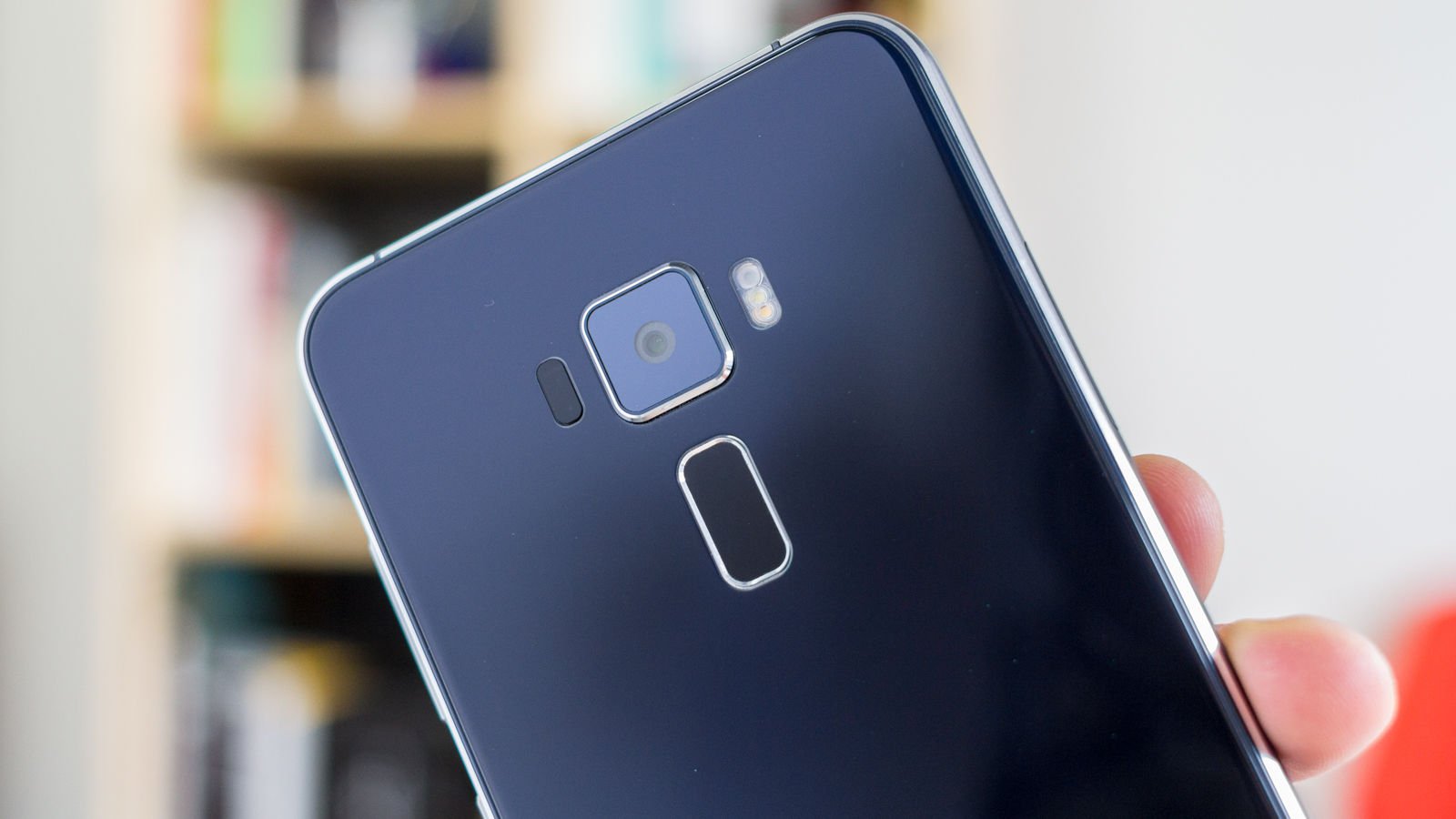
Asus has flattened out and added 2.5D glass panels to the phone's front and rear, resulting in a design not overly dissimilar to Samsung's Galaxy line-up and one that feels very smooth in the hand. This mirror finish appears to radiate light from around the camera and fingerprint sensor in an eye-catching way, though it also makes the ZenFone 3 very slippery and a magnet for fingerprints.
We found that on several occasions having left it sitting on top of its box the ZenFone 3 would jump off and thud on to our desk (thank heavens for Gorilla Glass 3). It could have been sitting there days, and with no obvious nudges to the table it surprised us every time. This Asus very much has a life of its own, though fortunately it doesn't appear to consume much battery life in doing whatever it's doing - standby runtime is very good.


A sandblasted metal trim front and back adds to the ZenFone's appeal, but while we like the coloured edges of the chassis it does look more plastic than metal.
You'll notice some obvious changes in the layout of the ZenFone. Where previously there were rear controls is a fast and responsive fingerprint scanner, while the power- and volume buttons now reside on the right edge. The rear speaker has also been moved beside a new USB-C port on the phone's bottom edge, and though it's still a mono model the ZenFone 3 now benefits from 192kHz/24-bit hi-res audio, a five-magnet speaker construction, metal voice coil and an expansive sound chamber powered by Smart Amp.


The rear camera is one of the key selling points of the ZenFone 3, up from 13Mp in the ZenFone 2 to 16Mp here and accompanied by a tri-LED flash. The front camera has also received an upgrade from 5- to 8Mp. See all smartphone reviews
We like the 5.5in Super IPS+ display on the front of the ZenFone 3. It's bright (up to 600 nits) and clear (with a full-HD resolution of 1920x1080, 401ppi), with rich colours and strong viewing angles. A blue-light filter is ideal for use at night, while it's reassuring to know as we approach colder weather that the display also supports glove touch.
We've seen slimmer bezels, but the 77.3 percent screen-to-body ratio could be worse. As it stands the ZenFone 3 is comfortable to hold in a single hand, though it's taller than we'd prefer with capacitive buttons sitting below the screen. And though we appreciate how their permanent labelling makes the phone easier to operate while you're getting used to it, they do detract from the overall design when the display is on standby.


On the whole the ZenFone 3 is a good-looking phone, but many of the changes come under the hood. And here's where it really impresses at this price point. Also see: What's the fastest phone 2016?
Asus has upgraded the ZenFone 2's Intel Atom Z3580 processor and PowerVR 6430 graphics to the Snapdragon 625 processor and Adreno 506 graphics used by the more expensive Huawei Nova Plus and Moto Z Play. We haven't been able to properly benchmark the Moto Z Play, though as you'll see below the Asus trumped the Huawei in our performance benchmarks. The extra gig of RAM could be a factor here, since the model we reviewed came with 4GB of LPDDR3 RAM.
This might be a mid-range phone, but performance is very decent. The ZenFone 3 is sufficiently capable for most daily tasks, and should satisfy all but the most demanding of users. The only thing that slows down use of the Asus is the sheer amount of bloatware you must wade through to find your way around.


Storage is a highlight for the ZenFone 3, and our review sample came with 64GB built-in and a microSD slot that can accept cards up to 2TB in capacity. Few users will struggle to manage this amount of storage, though a down side is that the Asus uses a hybrid SIM slot that forces you to choose between microSD support and dual-SIM functionality. The fact you get 100GB free Google Drive storage for two years goes a long way to compensate.
In our experience battery life from the 3,000mAh cell is good, particularly when the phone is on standby. Depending on your usage you will get somewhere between a day or two of runtime. We also like the fact the battery supports accelerated charging over USB-C, which allows the Asus to charge from zero to 100 percent in an hour and a half. It also claims a five-minute charge will net you an additional two hours of talk time. Also see: Best Android phones 2016