The Galaxy S7 and S7 edge have launched but are they the best phones of 2016? Here's our full and in-depth Samsung Galaxy S7 edge review.
PRICE WHEN REVIEWED
£639 inc VAT
SAMSUNG GALAXY S7 EDGE REVIEW
Samsung has now played around with a few curved screen smartphone and what felt like a bit of a gimmick is now a legitimate technology. Although the Galaxy S6 was the best phone of 2015, it was missing key features like expandable storage and waterproofing. Those are now back and the dual edge screen has more functionality so the Galaxy S7 edge is a serious contender for best phone of 2016. Here's our full and in-depth Samsung Galaxy S7 edge review. See also: The 20 best phones 2016.
Who has iPhone 7 in stock? Find out where to order an iPhone 7 today. .
The Galaxy S7 and S7 edge are two of the first flagship phones we've reviewed this year so it's just the beginning in the fight for best phone 2016. However, it's so far so good for the Galaxy S7 edge which is an improvement on its predecessors – the Galaxy S6 edge and Galaxy S6 edge+.
Another major feature has been returned so fans will rejoice at the inclusion of expandable storage through the Micro-SD card slot. That's two out of three and although the battery is still not removable, it is bigger. A larger battery cell means longer battery life and we really don't mind that the phone is a bit thicker to enable this (and make the camera bump smaller).
Helping out with battery life, according to Samsung, is a new processor and although we expected the Qualcomm Snapdragon 820 model in the UK we've actually got the Exynos 8890 chip. There's a whopping 4GB of RAM and the Galaxy S7 edge breezed through our benchmark tests setting some new records.
As you would expect, the Galaxy S7 edge comes packed with other tech including a fingerprint scanner and heart rate monitor, but the IR blaster has been dropped which will be a shame for some. A bigger deal is being made around the camera which has fewer pixels than the Galaxy S6 at 12Mp but Samsung touts amazing low light performance with the f/1.7 aperture and 'Dual Pixel' technology. We're really impressed with the camera and although it's one of the best on a phone, it's perhaps not as good in the dark as Samsung makes out.Also see: Best MiFi 2016.
A feature which isn't as big as we thought is the 'Always On' screen which is simply a software feature which shows some basic information on the display to avoid you unlocking the phone. It's handy but doesn't do as much as we thought and there's a small amount of control over it. That said, there are plenty of cool features hidden away in the settings which you'll want to explore including some existing ones like Smart Stay.
The Game Launcher is one software feature which helps you be a better player by doing things like blocking notifications, lowering the framerate to save power and record the screen while you play. It's the dual edge screen which makes the Galaxy S7 edge stand out and the key difference when compared to the regular model. It's still a luxury but Samsung has refined and improved what it can do with new edge panels and greater control.
That's an overview of the Galaxy S7 edge but we're going to go into a lot more detail below. Use the links below to help you navigate to the different sections of the review.
SAMSUNG GALAXY S7 EDGE REVIEW: PRICE AND RIVALS
Priced at
£639 from the official Samsung store, the Galaxy S7 edge is one of the most expensive smartphone on the market (short of luxury ones from the likes of Vertu). If you're contemplating buying it over the regular S7, it will cost you an extra £70 which isn't much of a premium to gain the dual edge display.
In terms of competition, the
Sony Xperia Z5 Premium is the closest on price at £599 from Sony's online shop. That phone is also a rival on the size, as is the
iPhone 6S Plus which is cheaper for the equivalent model at £619 but goes all the way up to £789 if you want 128GB of storage.
Other key Android rivals to the Galaxy S7 edge include the
LG G5 which is priced at £529 and the
Google Nexus 6P which is just £449, so there are cheaper options if your budget is more limited.
SAMSUNG GALAXY S7 EDGE REVIEW: DESIGN AND BUILD QUALITY
Over the years, the Samsung Galaxy S range has developed and changed quite a bit, with each flagship offering a different design to its predecessor – quite recognisably so. However, that seems to have changed with the Samsung Galaxy S7 edge, which looks a lot like the S6 edge with its curved edge display and body comprised of a gorgeous combination of glass and metal.
While some may feel cheated, we're pretty happy that Samsung decided to stick with a design that made the Galaxy S6 and
S6 Edge two of the most desirable phones of 2015. You can hardly blame the firm for not fixing something which wasn't broken.
One big change is that the S7 edge is bigger than its predecessor. Instead of offering two different sizes of the phone, Samsung has decided to make the S7 edge the larger option out of the two S7 phones. To this end, it's 5.5in in screen size which is slightly smaller than the 5.7in wielding
S6 edge+.
Despite this move, the S7 edge doesn't feel like a huge phone. An impressive 76 percent screen-to-body ratio means that it's actually only marginally bigger than the regular S7 – we're talking 2mm wider and 8mm taller.
At 7.8mm (Samsung says 7.7mm), the Galaxy S7 edge is a little thicker than the S6 edge which means two things. The first is that the camera bump is a lot smaller, 0.5mm, which is nice and there's also room for a bigger battery – although it's still not removable. We'll talk about
battery life later on in the review, but for now we applaud Samsung for providing this rather than trying to simply make a thinner phone for the sake of the numbers.
In terms of placement, everything is where it was before (buttons, ports and slots). You might notice that Samsung has stuck with a Micro-USB port instead of moving to USB Type-C (we'll talk about this more in the
hardware section). However, what you can't see from the outside is the resurgence of the Micro-SD card slot, which is combined with the SIM-card in one tray. It's a big advantage over the iPhone and some Android rivals, too.
Many Galaxy S6 owners were disappointed at the lack of waterproofing which was introduced on the Galaxy S5. However, it's one of the key design features of the Galaxy S7 edge (and regular model). It offers a rating of IP68, which means it's totally dust tight and can be submerged in up to 1.5m of water for up to 30 minutes. Better still, there's no fiddling with any flaps to cover ports or making sure the rear cover is clipped in properly (as on the S5).
With a very similar design to last year's S6 edge phones, the Galaxy S7 edge looks stunning with glass which almost wraps around to the back – which is also glass. Once again, it's easily in the top best looking phones on the market. A subtle tweak is that Samsung has removed all the silver bezels around the home button, camera, and the module containing the flash and heart rate monitor so things are a bit stealthier.
The design does have its drawbacks, though, as the thin metal frame at the side (due to the edge screen) makes it hard to pick up from a flat surface. The super smooth glass front and back also makes it a very slippery phone. Last but not least is that the back of the S7 edge is still a fingerprint magnet so you'll be wiping it constantly.
We've taken a look at the Onyx Black S7 edge which is blacker than the Galaxy S6 which had a nice blue tint. There's also a Gold Platinum colour and although those are the only ones available in the UK at the time of writing there are also white and Silver Titanium colours, too. The latter of which is a bit overly mirrored for our taste.
SAMSUNG GALAXY S7 EDGE REVIEW: HARDWARE AND SPECS
There's a lot to talk about when it comes to the hardware on offer with the Galaxy S7 edge. Phones are seriously advanced pieces of kit these days, arguably the most advanced considering how much is squeezed into something which fits into your pocket. We've split this section of the review up into smaller digestible chunks
GALAXY S7 EDGE SCREEN - BIGGER IS BETTER FOR THE S7 EDGE?
As mentioned in the design section, the screen size of the Galaxy S7 edge has jumped to 5.5in. That's in-between the S6 edge and S6 edge+ (5.1- and 5.7in respectively) which makes it seem like Samsung is only going to offer the one size and a shame for those out there who liked the smaller size edge screen. Perhaps Samsung was testing the water with the previous models to see which was more popular.
The size is really the main difference here in terms of the display tech. Samsung has stuck with a Quad HD resolution (1440x2560) instead of following Sony down the 4K route. That's something we're glad of after finding the Xperia Z5 Premium simply unnecessary. A pixel density of 534ppi ensures a perfectly crisp image.
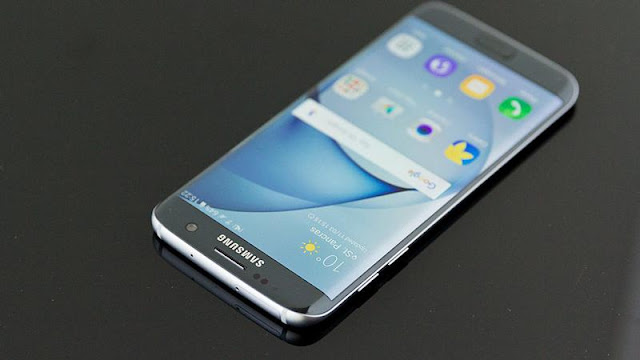
As expected, the firm continues to use its preferred SuperAMOLED screen technology which provides an excellent all-round viewing experience including superb contrast, brightness and viewing angles. Colours are, as usual, vibrant and punchy which results in an impressive effect but some may find it a little over the top. If you don't like the look of the display you can switch the screen mode between adaptive (default), AMOLED cinema, AMOLED photo and basic. These modes adjust the colour range, saturation and sharpness of the screen.
The main reason to buy the Galaxy S7 edge over the regular S7, or other smartphones, is the dual edge display. We'll talk more about what it can do in the software section below, but it looks and feels awesome even when you're not doing anything with it. When you swipe between homescreen panels or the app menu, icons roll satisfyingly off and on the sides. It doesn't have the same impact for scrolling vertically though a web page or watching a video in landscape but it's still nice – most certainly a luxury than a necessity.
As previously the Galaxy S7 features Smart Stay will keep the display on as long as you're looking at it. For example, it will ignore your screen time out and keep the display on if you're reading an article or looking at an image. It's another feature which needs switching on in the settings, though.
GALAXY S7 EDGE ALWAYS ON DISPLAY
It's more a software feature but the Galaxy S7 edge display is 'always on' should you want it to be. This means you can get basic information without even laying a finger on the phone. You'll get information such as the time, date and battery percentage, plus notifications although this seems to be limited to calls and text messages.
What's disappointing is that there's little control over this feature. You can choose between a clock, calendar and image to display, with a few different styles for each and an optional background for the first two. However, you can't choose to switch off notifications for example, or stop the widget jumping around the screen periodically. When it does move – presumably to avoid lighting up the same pixels constantly – it's distracting and occasionally sits annoyingly a fraction off centre. This will, of course, use more battery juice but it's not enough to have a significant impact on battery life.
Making sure the screen switches off when it's somewhere dark like a pocket or a bag is something we thought happened automatically but you actually need to switch this on in the display settings.
Update October 2016: Samsung is rolling out an update to the Galaxy S7 and Galaxy S7 edge that includes the new features introduced by the Note 7’s always-on display (before it was discontinued). These include a new calendar option, a new digital clock to which you can add a custom text signature, the ability to show the current music track, and some enhancements to battery usage that see the always-on display consume just 1% per hour. You can update to version 1.4.02 of the Always on Display in the Galaxy Apps store, or by tapping Settings, Display, Always On Display, About Always on Display, Update.
GALAXY S7 EDGE PROCESSOR, MEMORY AND BENCHMARKS
Although we would have put good money on the Galaxy S7 edge getting the Qualcomm Snapdragon 820 processor in the UK, it's a good job we didn't as it actually has Samsung's own Exynos 8890 chip instead. There's also an upgrade in the form of 4GB of RAM, a rather healthy amount for a smartphone – the Galaxy S6 models have 3GB.
For those of you interested in the technical details, the Exynos 8890 is an octa-core processor which features four 2.3GHz cores and four 1.6GHz cores. The chip will decide which to use based on the task. The GPU is a Mali-T880 MP12 which is a step up from the Mali-T760 MP8 found in the Galaxy S6 edge.
Overall, Samsung says the Galaxy S7 is 30 percent faster on the CPU front and 64 percent faster when it comes to graphics. In our tests, the S7 edge isn't far off these claims.
In our benchmark tests the Galaxy S7 edge has set a new record in Geekbench 3 by beating the Huawei Mate 8 and the Galaxy S7. It's also a beast in the GFXBench graphics tests, although the iPhone 6S is still the winner here due to its lower screen resolution – the figures are impressive for a Quad HD phone, though. In the JavaScript JetStream test, the Galaxy S7 edge proved better than any other Android handset we've seen but the iPhone remains the leader of the pack here.
Checkout all the full Galaxy S7 edge benchmark results compared with its predecessor and rivals in the below interactive table.
GALAXY S7 EDGE STORAGE AND MICRO-SD
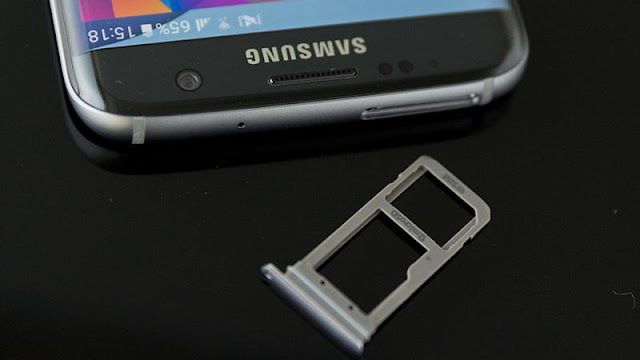
As well as testing screen sizes with the Galaxy S6 models, Samsung may have also been seeing which storage capacity consumers prefer by matching the iPhone 6S with 32-, 64- and 128GB models. The Galaxy S7 edge, as mentioned earlier, heralds the return of expandable storage. Correcting the lack of a Micro-SD card slot on the previous model is the right move and likely to be why Samsung is only producing the Galaxy S7 edge in a 32GB capacity.
This is a key advantage for the Galaxy S7 in the battle against the iPhone and the Micro-SD slot can support up to 200GB cards. However, despite running Android 6.0 Marshmallow, the phone doesn't allow for Adoptable Storage – a feature which allows a memory card to be viewed as internal storage, combined with the built in storage.
It appears that Samsung has made this decision, in part, to avoid confusing users. It's a shame but not the end of the world; you'll just have to carry on using the memory card in the old fashioned way. You can move apps to SD card on the Galaxy S7 edge via the storage section of the setting menu. Navigate to the apps section of internal storage, select the apps, hit change and choose SD card.
GALAXY S7 EDGE FINGERPRINT SCANNER
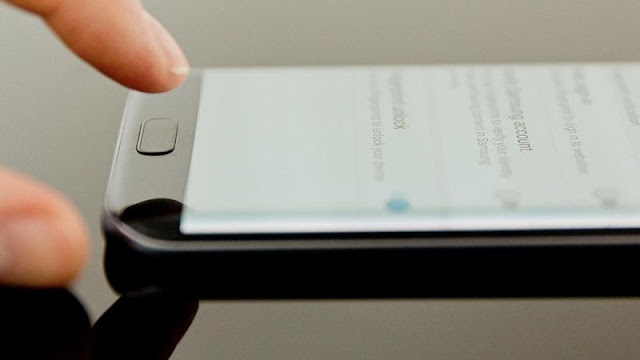
There's no change on the fingerprint scanner front, it's still hidden inside the physical home button which sits below the screen. The button is more discrete as it no longer has a silver rim around the edge.
You can register a fingerprint to unlock the phone with (using a backup password, PIN or pattern) during the initial set up. Thereafter, you can head into the settings to add more of your digits – doing at least both your thumbs will be useful and you can add up to four in total.
The disappointment here is that we've not found the fingerprint scanner on the S7 edge very quick or reliable. We frequently get messages such as 'no match' or 'keep your finger on the home key a little longer'. It essentially is a bit picky so you need to be quite careful about how you touch the sensor which is a problem we didn't even find with the Galaxy S6. It's by no means unusable but certainly frustrating at times.
If the same happens to you, try re-registering your fingerprint. After doing this, we have seen things improve a little. Interestingly, it's not an issue we've encountered on the regular Galaxy S7.
GALAXY S7 EDGE BATTERY LIFE, WIRELESS CHARGING, QUICK CHARGE AND USB
Although Samsung has clearly answered requests for waterproofing and Micro-SD, the Galaxy S7 edge doesn't have a removable battery - the LG G5 does despite its metal design. The saving grace here is that the capacity has been increased to a generous 3600mAh which is 600mAh more than the Galaxy S6 edge+ so we really don't mind that the phone is a little fatter.
Galaxy S7 edge battery life is impressive and over a 24 hour period of what we'd call regular usage we still had 59 percent of the juice left. On that basis, the phone will last a decent two days unless you rinse it with demanding tasks like watching films or gaming. In our battery benchmark using Geekbench 3, the Galaxy S7 edge set a record with 11 hours and 25 minutes and a score of 6855 outpacing the Huawei Mate 8 which lasted 10 hours 15 minutes with a score of 6091.
The regular Galaxy S7 with its smaller battery (3000mAh) managed nine hours and 15 minutes in the same test.
Samsung hasn’t gone with the reversible USB Type-C port and has instead stuck with Micro-USB 2.0. That may surprise some for a flagship phone in 2016 but Samsung told PC Advisor that it doesn't see the value. The same is true when it comes to Quick Charge 3.0 so the Galaxy S7 edge with the Snapdragon 820 processor only supports Quick Charge 2.0.
With the UK model powered by the Exynos 8890, Samsung says the S7 edge can charge to full in 100 minutes using its own 'Adaptive Fast Charging' which you can even switch off in the settings if you're worried about damaging the battery or the phone getting too hot. We found that the S7 edge charged to full in 98 minutes using the supplied charger.
At the end of the day, these are minor quibbles and not only is the Galaxy S7 edge supplied with a fast charger, it also features wireless charging so you'll find it easier to keep topped up if you buy the right accessory.
GALAXY S7 EDGE CAMERAS
With regards to photography, you'll find a 12Mp at the rear of the Galaxy S7 edge, the same camera as the regular model. The more astute of you will point out that the S6 Edge had a 16Mp camera, and while Samsung has dropped the resolution, megapixels aren't everything and it has made improvements in other areas. The rear-facing camera features a Samsung Britecell sensor only 1/2.6in in size, a 1.4 µm pixel size, 26mm lens and an f/1.7 aperture.
There's no dual-tone LED flash like some rivals but Samsung does offer optical image stabilisation (OIS) here which helps keep videos smooth and avoid blurry pictures. Low light performance is the big thing being touted by Samsung.
As you would expect, the Galaxy S7 edge can shoot video at 4K (2160p) resolution which is at 30fps. It can record slow motion at 240fps at 720p, shoot HDR video and simultaneously record 4K video while capturing 9Mp still images.
Interestingly, Samsung added a new image type to the S7 and S7 edge - while it wasn't exactly the iPhone Live Photos rival we'd heard rumours about, it's the next best thing. When taking a panorama on a Galaxy S7 edge, you're able to 'play' it back as if it were a video complete with motion, and you're also able to control the direction by swiping the display. It's called Motion Panorama and the effect is somewhat hit and miss depending on the subject.
Taking a photo as standard, the Galaxy S7 edge shoots in a 4:3 aspect ratio so if you want a wider 16:9 you need to dial things down to 9.1Mp at the most. There's no dedicated shutter button as such but you can use the volume buttons instead and the heart rate monitor for the front camera. We love how quickly the camera launches by double tapping the home button, even with the phone locked. You can also shoot quickly with effectively zero shutter lag and quick acting phase detection auto focus.
There are a bunch of different camera modes to choose from so if you don't like sticking with Auto you can launch the Pro mode for detailed control. There's also Selective focus, Video Collage, Live broadcast, Hyperlapse, Food and Virtual shot to name most of them, plus you can download more.
OUR VERDICT
The Galaxy S7 edge is no longer the semi-gimmick it was before. Although some of the main features are things from the Galaxy S5 – Micro-SD and waterproofing – Samsung has given fans what they want. It's now a refined, sophisticated and highly desirable piece of technology. The battery isn't removable but the phone lasts longer than before and has seriously powerful specs under the hood. It has almost everything you could want from a phone even though the IR blaster is gone. We're also very impressed with the new camera and unless the screen is too big for you (despite some software features to help out) we think it's worth getting the S7 edge for the extra £70 with its gorgeous looks and extra functionality. Right now, this is the best smartphone money can buy.


